May 2026 · 10 min read · By the KwickOS Editorial Team
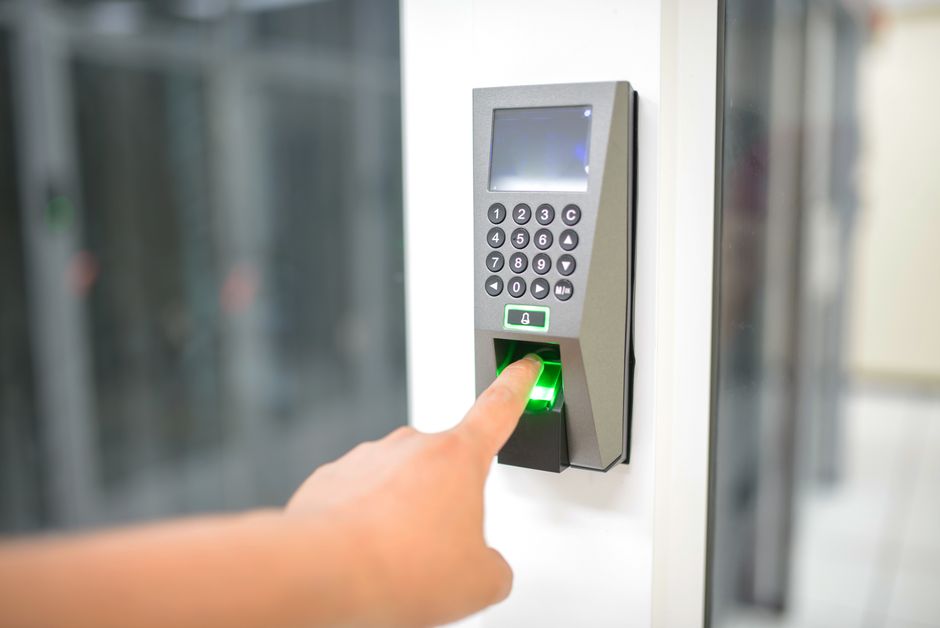
Salon Fingerprint Time Clock: Stop Buddy Punching and Simplify Payroll
Every salon owner has felt it at some point — a nagging suspicion that the hours on the timesheet do not quite match the hours actually worked. A stylist clocks in a colleague who is running late. A nail tech rounds up to the nearest quarter hour. Paper records go missing on a busy Saturday. These small, unremarkable moments add up to one of the most overlooked profit drains in the beauty industry.
Biometric fingerprint time clocks help close that gap. This guide explains how they work, which legal requirements to consider, and what to look for when time tracking is part of your salon POS.
The Invisible Theft: What Buddy Punching Really Costs You
Buddy punching — when one employee clocks in or out on behalf of another — is not malicious in most cases. It is a favor between coworkers. But the financial damage is real and consistent.
Time theft can affect any business that relies on self-reported hours, and a few minutes here and there per employee adds up to real hours every week. For a salon, the math is straightforward and sobering.
Example calculation: A stylist earning $18/hour who fudges 15 minutes per shift, five days a week, costs you $1,170 per year in unearned wages alone ($18 × 0.25 hours × 5 shifts × 52 weeks). Add the employer share of Social Security and Medicare (7.65%), and the figure is closer to $1,260. With three employees doing the same, that is about $3,780 per year.
Run that same arithmetic for a small to mid-size salon with 5–10 employees and you land in the low thousands of dollars per year. This is money that disappears without a line item on any expense report, which is why it is easy to miss.
Beyond buddy punching, there is also the problem of casual rounding. Employees who manage their own timesheets (paper or digital PIN entry) may round in their own favor. Example: if each self-reported shift is padded by 8–10 minutes, a 12-person team working five shifts a week for 52 weeks adds roughly 416–520 hours of payroll nobody worked.
Why PIN Codes and Paper Timesheets Fall Short
Many salons graduate from paper to PIN-based time clock systems and consider the problem solved. It is not. PIN codes have three fundamental weaknesses:
- They are shareable. A four-digit code takes three seconds to whisper. Buddy punching with PINs is just as easy as with paper — and harder to detect because it looks like a legitimate digital record.
- They are forgettable. Employees who forget PINs create manager interruptions, workarounds, and frustration that erodes the system's integrity.
- They create false confidence. Digital records feel authoritative, but a PIN log is only as honest as the person who entered it. Owners often assume the data is accurate when it is not.
Paper timesheets fail even more dramatically. Handwritten records are illegible, easily altered, and routinely lost. Reconstructing hours after the fact from memory introduces errors. And when a labor dispute arises, incomplete paper records are hard to rely on.
The verification problem: With paper or PIN systems, you cannot prove who was physically present. With fingerprint biometrics, the person has to be there. A fingerprint cannot be shared like a PIN, and the clock records who was at the terminal and when.
How Fingerprint Time Clocks Work
Modern optical or capacitive fingerprint sensors capture the unique ridge pattern of a fingertip and convert it into a mathematical template — a numerical string of data points that represents the fingerprint's geometry. This is the critical distinction: the system does not store a photograph or image of your employees' fingerprints. It stores a template, which well-designed systems keep encrypted.
When an employee clocks in, the process works as follows:
- The employee places a finger on the sensor (typically index or middle finger).
- The sensor captures a live scan.
- The system converts the scan to a template and compares it against stored templates using a matching algorithm.
- If the match meets the system’s threshold, the clock-in is confirmed and timestamped.
- The process from finger on sensor to confirmation usually takes a moment.
Accuracy varies by sensor and by finger condition. Ask vendors for their false rejection rate (legitimate employees incorrectly denied) and false acceptance rate (a different person incorrectly accepted), and test with your own team.
For employees whose fingerprints are difficult to read — a small percentage of the population, particularly those who work extensively with chemicals — many systems offer a backup method such as a manager-assisted PIN override, which is logged separately and therefore still auditable.
Break Tracking and Meal Period Compliance
Wage and hour violations are a common — and expensive — legal exposure for salon owners. In states with strict break requirements, failing to provide or properly document rest periods can result in one additional hour of pay per employee for each workday a required break is not provided. That liability compounds quickly.
California requirements (rest periods, meal periods):
- One 10-minute paid rest break for every 4 hours worked (or major fraction thereof)
- A 30-minute unpaid meal period for shifts exceeding 5 hours
- A second 30-minute meal period for shifts exceeding 10 hours
- Failure to provide a required rest or meal period triggers one additional hour of pay at the regular rate for that workday
New York requirements for non-factory workers include (NY DOL):
- A 30-minute meal break between 11 a.m. and 2 p.m. for shifts of six hours or longer that extend over that period
- An additional 20-minute meal break between 5 p.m. and 7 p.m. for workdays that run from before 11 a.m. to after 7 p.m.
- A 45-minute meal break midway through shifts of more than six hours that start between 1 p.m. and 6 a.m.
Why this matters for biometric clocks: A fingerprint time clock that tracks break start and end times creates an auditable break log. When a Department of Labor investigator asks for your break compliance records, you can produce timestamped records for every employee for every shift, tied to the person who was actually present.
Good salon time clock software can also alert managers when a break is overdue — preventing the violation before it occurs rather than simply documenting it after the fact.
Overtime Calculation Automation
Overtime rules vary significantly by state and classification. Federal law (FLSA) requires 1.5x pay for hours over 40 in a workweek. California goes further, requiring daily overtime (1.5x after 8 hours, 2x after 12 hours, and double time for the first 8 hours on the seventh consecutive day of a workweek).
Calculating this manually — even with spreadsheets — is error-prone. Common mistakes include:
- Failing to include commissions, non-discretionary bonuses, or service charges in the regular rate of pay for overtime calculations (tips themselves are generally not included under federal law)
- Incorrect workweek definitions (workweek can be any 7-day period, but must be consistent)
- Missing daily overtime in states that require it
- Incorrect handling of split-rate pay (e.g., stylists paid differently for services vs. retail sales)
A time clock system that feeds directly into payroll software can reduce these errors. Hours are recorded, categorized by type, and overtime rules can be applied consistently. Still review the overtime settings against your state’s rules.
Integration with Payroll: Eliminating Manual Entry
The true value of a fingerprint time clock is not just the prevention of time theft — it is the elimination of the manual data transfer step that turns every payroll period into a frustrating reconciliation exercise.
Without integration, the typical payroll workflow looks like this: collect timesheets or export a CSV, re-enter hours into payroll software, check for anomalies, fix errors, re-run totals, and submit. Each manual step is an opportunity for transcription error. Manual data entry always carries an error rate — and this is an environment where a single wrong digit can overpay or underpay a worker.
With integrated biometric time tracking, the workflow compresses dramatically:
- All clock-ins and clock-outs are recorded automatically throughout the pay period.
- At payroll time, the system exports a verified hours file directly to your payroll provider (ADP, Gusto, QuickBooks Payroll, etc.).
- You review the summary, approve, and submit.
The review step still matters — managers should flag anomalies like unusually long shifts or missing clock-outs — but much of the data entry work is gone.
See the KwickOS Time Clock
Time clock with overtime and break tracking, schedule management, and payroll integration.
Request a Free Demo →Privacy Concerns: What Actually Gets Stored
The most common objection salon owners hear when introducing fingerprint time clocks is employee pushback on privacy grounds. This concern is legitimate and deserves a direct, honest answer — not dismissal.
Here is the technical reality: a well-designed biometric time clock system never stores a fingerprint image. It stores a mathematical template — a set of numerical coordinates representing the spatial relationships between ridge endpoints and bifurcations. In a well-designed system, this template:
- Is not a picture of the fingerprint
- Is stored encrypted and deleted on a written schedule
BIPA compliance (Illinois Biometric Information Privacy Act) is one of the strictest biometric privacy laws in the United States. Section 15 of BIPA (740 ILCS 14/15) requires, among other things:
- Written informed consent from each employee before biometric data is collected
- A written policy stating the purpose and retention schedule for biometric data
- Permanent destruction of biometric data when the initial purpose is satisfied or within 3 years of the individual’s last interaction with the business, whichever comes first
- Prohibition on selling or profiting from biometric data
Best practice for salon owners: Provide every employee with a one-page biometric consent form before enrollment. Document when each employee consented, and maintain a data retention schedule. Texas and Washington also have biometric privacy laws, and some cities have their own rules. Ask an employment lawyer which apply to you, and ask your vendor what consent documentation it provides.
When employees understand that their actual fingerprint is never stored and see the transparent consent process, many become more comfortable. Often the concern is less about biometrics than about an unfamiliar technology, and a clear explanation helps.
How the KwickOS Time Clock Fits In
Standalone time clocks often mean a separate device, a separate login, and a separate data export to payroll. KwickOS includes a time clock with overtime and break tracking as part of its employee management features.
Keeping time tracking inside the POS has practical advantages:
- One system. Staff clock in on the same system they use to check in clients and manage appointments.
- Single employee record. Hours, tips per employee, and commissions sit alongside each other, and KwickOS lists payroll integration among its employee-management features.
- Labor cost reports. Owners and managers can review labor costs in reports.
- Offline capability. KwickOS uses a hybrid cloud + local architecture that keeps working when the internet drops.
- Multi-location support. KwickOS supports multi-location management for salon groups.
Break tracking is part of the same time clock, so break records sit next to clock-in and clock-out times. Ask during a demo which identity options are available at clock-in for your hardware.
Comparison: Paper vs. PIN vs. Fingerprint vs. Facial Recognition
| Feature | Paper Timesheets | PIN / Badge | Fingerprint Biometric | Facial Recognition |
|---|---|---|---|---|
| Prevents buddy punching | No | No | Yes | Yes |
| Prevents time rounding fraud | No | Partial | Yes | Yes |
| Audit trail quality | Poor | Moderate | Strong | Strong |
| Break compliance tracking | Manual | Manual | Automated | Automated |
| Payroll integration | Manual entry | Export required | Direct integration | Direct integration |
Facial recognition is emerging as an alternative to fingerprint scanning, but it carries greater privacy complexity. Several states and municipalities have enacted or are considering laws specifically restricting facial recognition data, and some employees find a face scan more intrusive than a fingerprint tap. Weigh security, cost, legal requirements, and employee comfort for your own team.
Making the Switch: What to Expect
Transitioning from paper or PIN to fingerprint time tracking can usually be planned around a pay period or two. The practical steps are:
- Select your system — ideally one integrated into your POS to avoid managing separate software subscriptions and data silos.
- Prepare consent documentation — ask your vendor and an employment lawyer for consent forms that fit your state. Have employees review and sign before enrollment.
- Enroll employees — capture fingerprint templates for each staff member. Enroll both index fingers in case one is injured.
- Run parallel systems for one pay period — keep your old timesheets running alongside the new system for the first pay period. Compare totals. A consistent difference may point to past time loss.
- Integrate with payroll — configure the direct export to your payroll provider. Verify that overtime rules match your state's requirements.
- Set break alerts — configure California or New York break rules if applicable, or set custom alert thresholds for your state.
To estimate the return, use the example calculation above with your own wages and shift counts, and compare it with what the system costs you.
Ready to Tighten Up Time Tracking?
KwickOS includes a time clock with overtime and break tracking, labor cost reports, and payroll integration.
Get a Free Demo →Frequently Asked Questions
Is it legal to require employees to use a fingerprint time clock?
Often, yes, but it depends on where you operate. Illinois (BIPA) requires written notice, a written release, and a public retention policy before collecting biometric data; Texas and Washington also have biometric laws, and some states and cities have their own rules. Giving written notice, getting written consent, and publishing a retention policy is good practice everywhere. Check with an employment lawyer before making biometric clock-in mandatory.
What happens if an employee's fingerprint does not scan correctly?
A small percentage of people — typically those with very worn, dry, or chemically damaged fingertips — have fingerprints that are harder to read consistently. Good biometric systems address this in two ways: first, by enrolling multiple fingers (so if one is damaged, another works); second, by providing a manager-assisted override PIN that creates a flagged exception record rather than a standard clock-in. This maintains the audit trail while accommodating the biological reality that not every fingerprint reads perfectly every time. In practice, enrollment quality matters most — taking the time to capture good initial scans dramatically reduces false rejections during daily use.
Can a fingerprint time clock integrate with my existing payroll provider?
Many time clock systems support export to common payroll providers, typically via a CSV export or an API connection. KwickOS lists payroll integration among its employee-management features. Before committing to any time clock system, verify that it supports your specific payroll provider and confirm whether the integration is included or requires an additional fee.
How does a fingerprint time clock handle break compliance in California?
Look for a time clock that records four events: shift start, break start, break end, and shift end. California requires a 10-minute rest period per four hours worked or major fraction, and a meal period no later than the end of the fifth hour of work, so a system that warns managers before those points helps. At payroll time, a break report showing each break and its duration is useful. This documentation is critical in the event of a wage claim or audit.
How much does a salon fingerprint time clock system cost?
Prices vary by hardware, software subscription, and payroll integration, so get current quotes. If you already use a POS, ask whether a time clock is included and what extra hardware, if any, it needs. Then compare the cost with your own estimate of lost labor using the example calculation above.
The Bottom Line
Time theft in salons is not a people problem — it is a systems problem. When the path of least resistance is to round up a few minutes or clock in a coworker, some employees will take it. Not out of malice, but because the system makes it easy and the consequences feel invisible.
A fingerprint time clock changes the architecture of the problem. It makes accurate time recording the easy option. It creates an auditable record that protects both employer and employee. It automates the break compliance documentation that wage-and-hour law requires. And it connects directly to payroll, eliminating the manual reconciliation that costs owners hours every pay period.
Run the numbers for your own salon. When time tracking is part of the POS you already use, there is one less system to manage.
If you are still running paper timesheets or a PIN-based system, it is worth comparing what your current records cost you.